Runs offline · your music stays on your machine

Music project intelligence.

Turn audio, MIDI and production notes into a searchable project library. Measure tempo, key and loudness, track unfinished work, and ask questions with answers linked tothe original files.

Architecture & evaluation
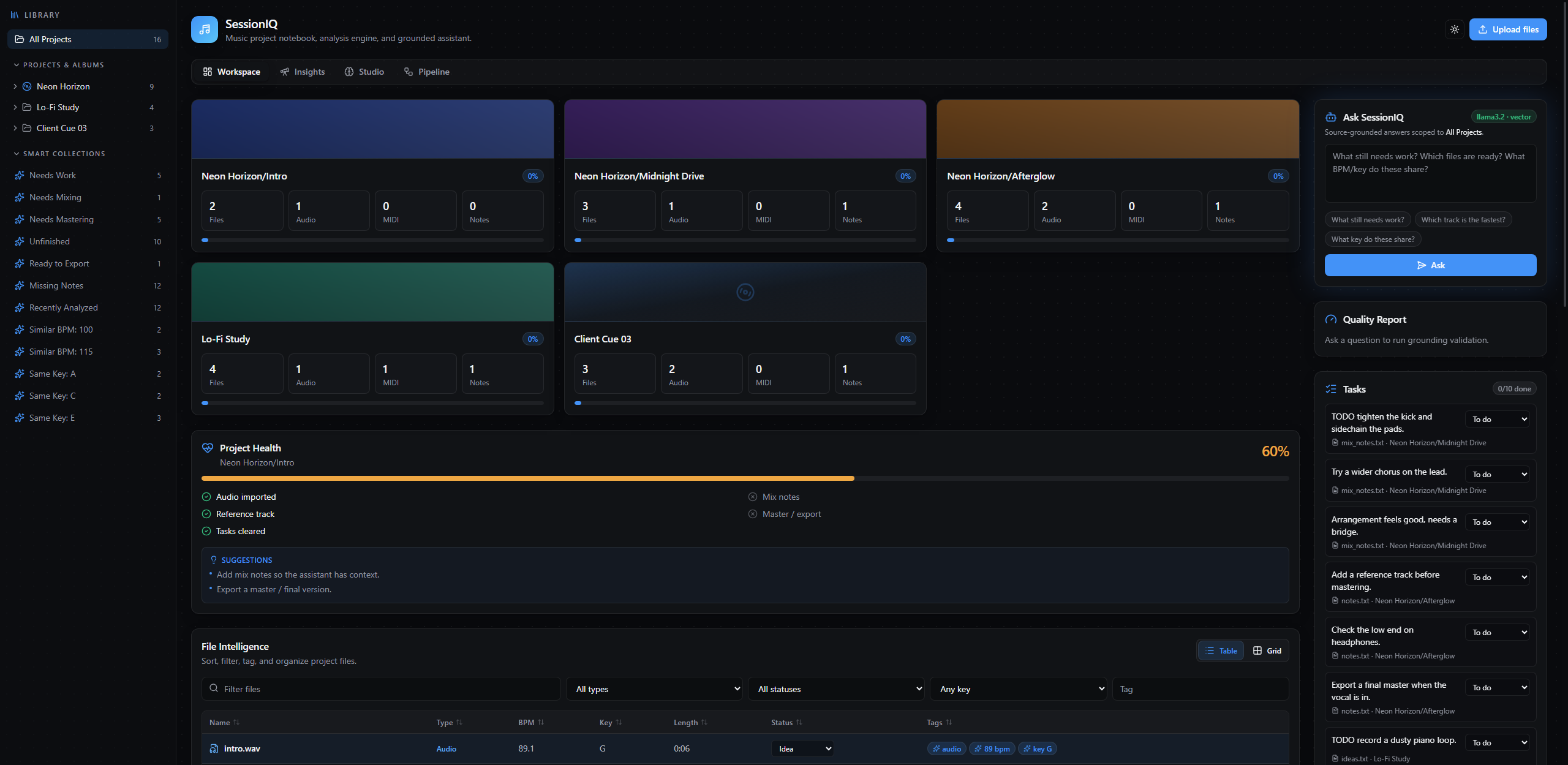
The SessionIQ workspace showing five music projects, open tasks, and their progress.

Actual workspace · Generated demo library

Interface
React · TypeScript
Audio analysis
Python · librosa
API
FastAPI · Pydantic
Evaluation
Labeled queries · Published results

The problem

Production files lose context between sessions.

01

“Where is the right file?”

Every project, every bounce, every version in one organized place — with search across the whole catalog and files that move on disk when you rename a project.

02

“What is actually finished?”

Track metadata, open tasks and a readiness checklist for each song make unfinished work visible across the library.

03

“How does my mix compare?”

Mark a track as your reference and every mix is measured against it — signed differences in loudness, tone and length, so "it sounds quieter" becomes a number.

04

“What did we decide last time?”

Session notes, a decision log, and preferences that persist. Record what you chose and it comes back later, quoted, with the file it came from.

Your library, measured

Audio and MIDI analysis in one library.

Tempo, key with major or minor, peak and RMS level, integrated loudness to the broadcast standard, spectral brightness, beat positions, and for MIDI the notes, pitch range and instruments. All of it computed locally, on your machine.

FileProjectBPMKeyLoudnessLengthStatus
midnight_drive.wavNeon Horizon / Midnight Drive117E−18.38.0sIn Progress
afterglow.wavNeon Horizon / Afterglow117E−18.48.0sIdea
afterglow_master.wavNeon Horizon / Afterglow117E−18.48.0sReady
lofi_sketch.wavLo-Fi Study76C−18.97.0sIdea
cue_draft.wavClient Cue 0399A−19.96.0sNeeds Work

Sample from the demo library SessionIQ generates on first run.

Mix vs reference

“Is my master quieter than the reference?”

Mark any track as your reference and every mix in the project is measured against it — signed differences in loudness, tone and length, available alongside the source files.

afterglow.wav vs afterglow_reference.wav

Integrated loudness
−25.0 LUFS−18.4 LUFS+6.6 dB
Length
8.0 s8.0 smatched
Key
E majorE majormatched
Brightness
1 190 Hz1 202 Hz+12 Hz

Ask it anything

Answers grounded in your project files.

Ask across one song or the entire catalog. Follow-ups work — “what about its key?” — and every answer arrives with the files it came from, so you can check it.

Counts, comparisons and superlatives are computed from the real metadata rather than guessed at, which is why "which track is the loudest" gets an exact answer instead of a list of likely candidates.

How it is measured
Assistantdemo library

Which track is the loudest?

Client Cue 03/reference.wav — integrated loudness −15.5 LUFS, the highest in the library. The quietest is afterglow_reference.wav at −25.0.

  • reference.wav
  • afterglow_reference.wav

Which tracks are the fastest?

Four tracks tie at 117.5 BPM: midnight_drive.wav, afterglow.wav, afterglow_master.wav and afterglow_reference.wav. The slowest is lofi_sketch.wav at 76 BPM.

  • midnight_drive.wav
  • afterglow.wav
  • afterglow_master.wav
  • lofi_sketch.wav

Answers shown are the computed result over the generated demo library. Every number is checked against the cited files before an answer is shown; one that fails is withheld.

Screens

A closer look at the product.

Insights

What to work on next

Projects ranked by how close they are to finished, with the stalled ones surfaced instead of buried. Search finds files by what they sound like rather than what they are called, and the similarity engine shows you why two tracks were paired — tempo, brightness, loudness, length and key, broken out separately.
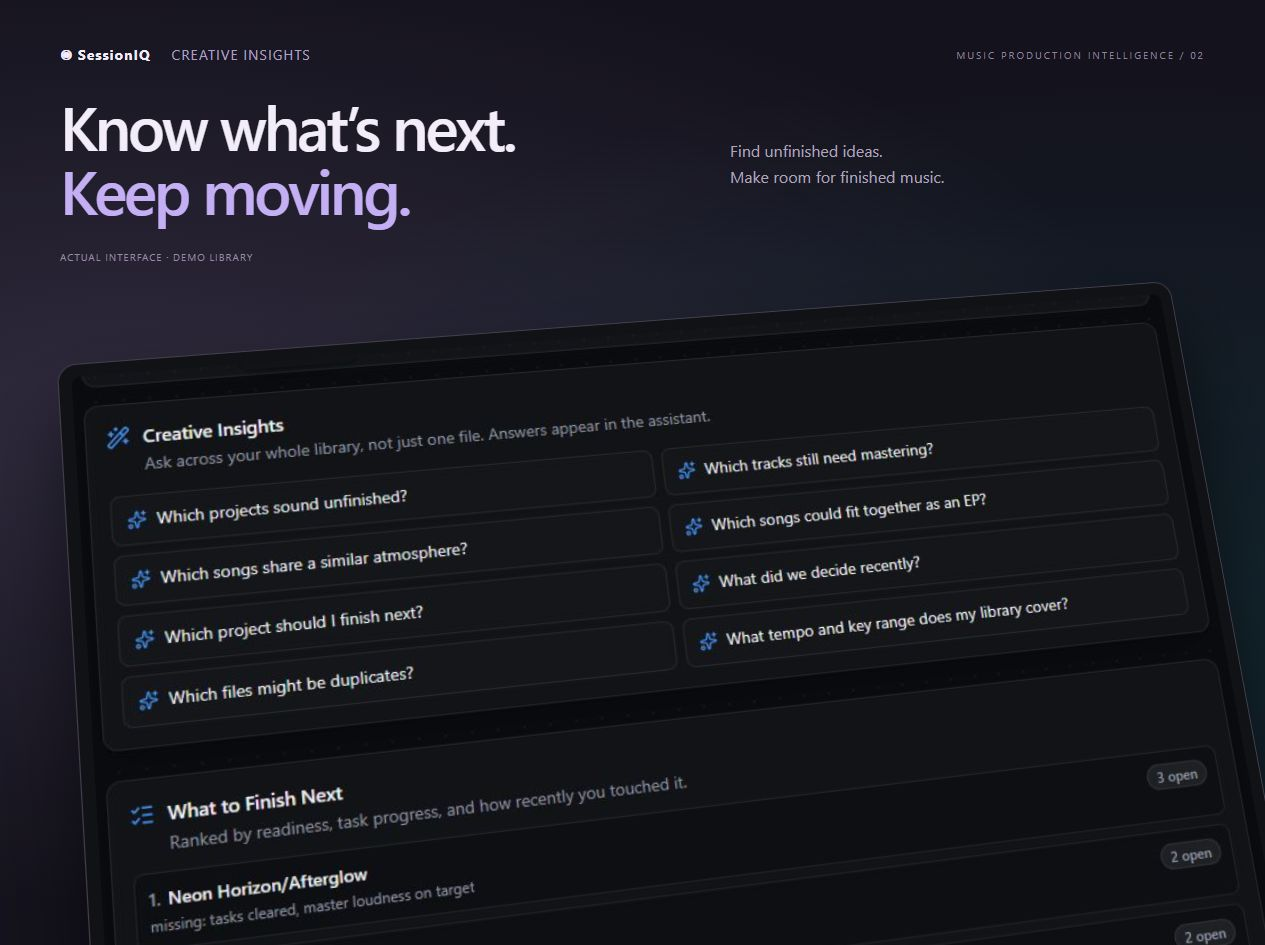
A perspective close-up of SessionIQ Insights, showing creative question starters and projects ranked by what to finish next.

Studio

Session history and creative context

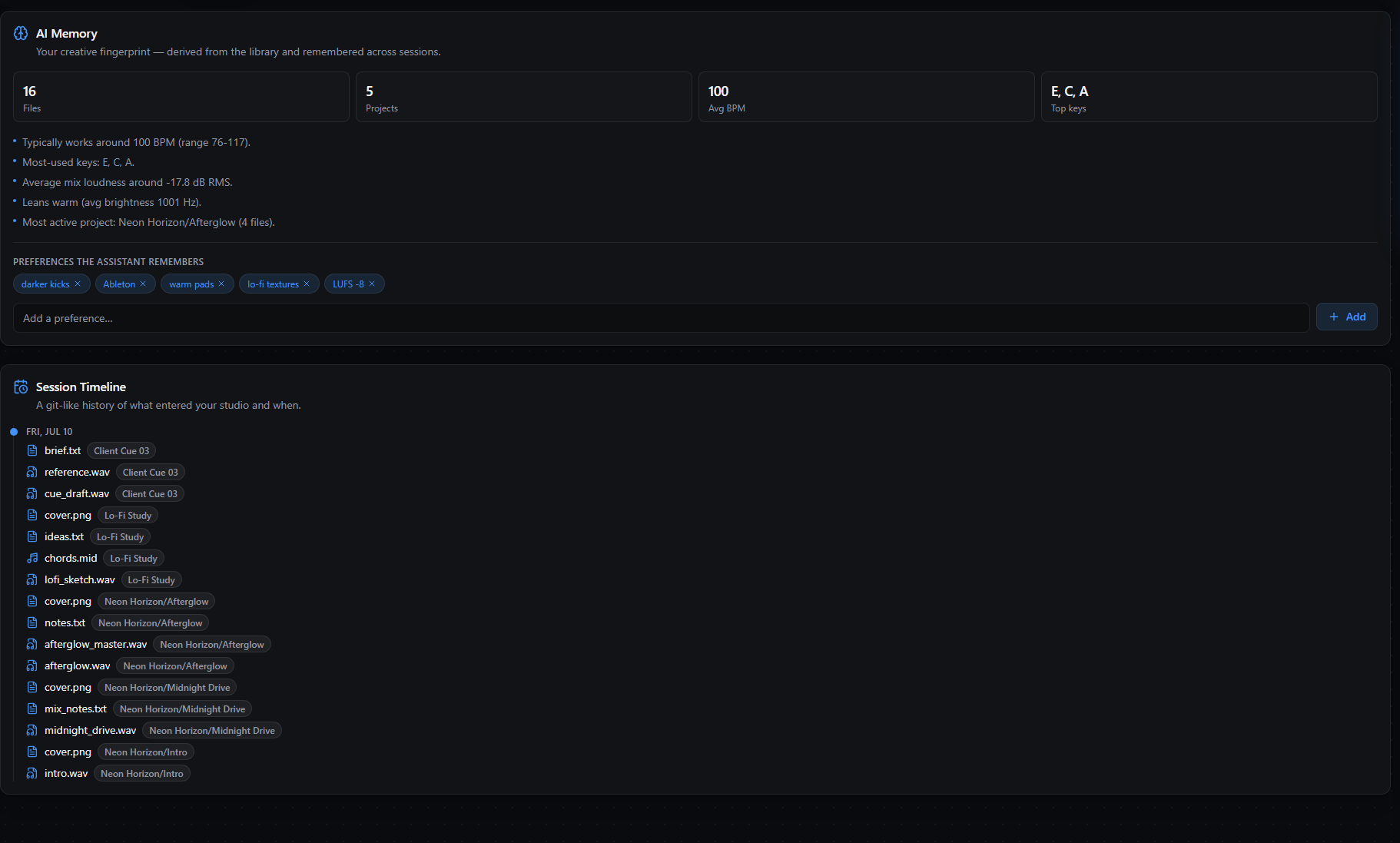
A fingerprint built from your own catalog rather than typed in — the tempo you actually work at, the keys you keep returning to, how loud your mixes land. Your preferences come back on the next session, and the timeline is a history of what entered the studio and when.

The Studio view: AI memory showing a creative fingerprint with file, project, tempo and key statistics, remembered preferences, and a session timeline listing files by the date they arrived.

Under the hood

From uploaded files to source-cited answers.

The system separates ingestion, analysis, retrieval, answering and validation. The repository includes an evaluation harness with labeled queries, recorded results and documented limitations. The measurements below can be reproduced from that harness.

  1. 01

    Ingest

    Audio, MIDI, notes, artwork

  2. 02

    Analyze

    Tempo, key, loudness, brightness

  3. 03

    Retrieve

    Lexical, metadata, optional vectors

  4. 04

    Answer

    Grounded, tool calls for exact counts

  5. 05

    Validate

    Citations and numbers checked

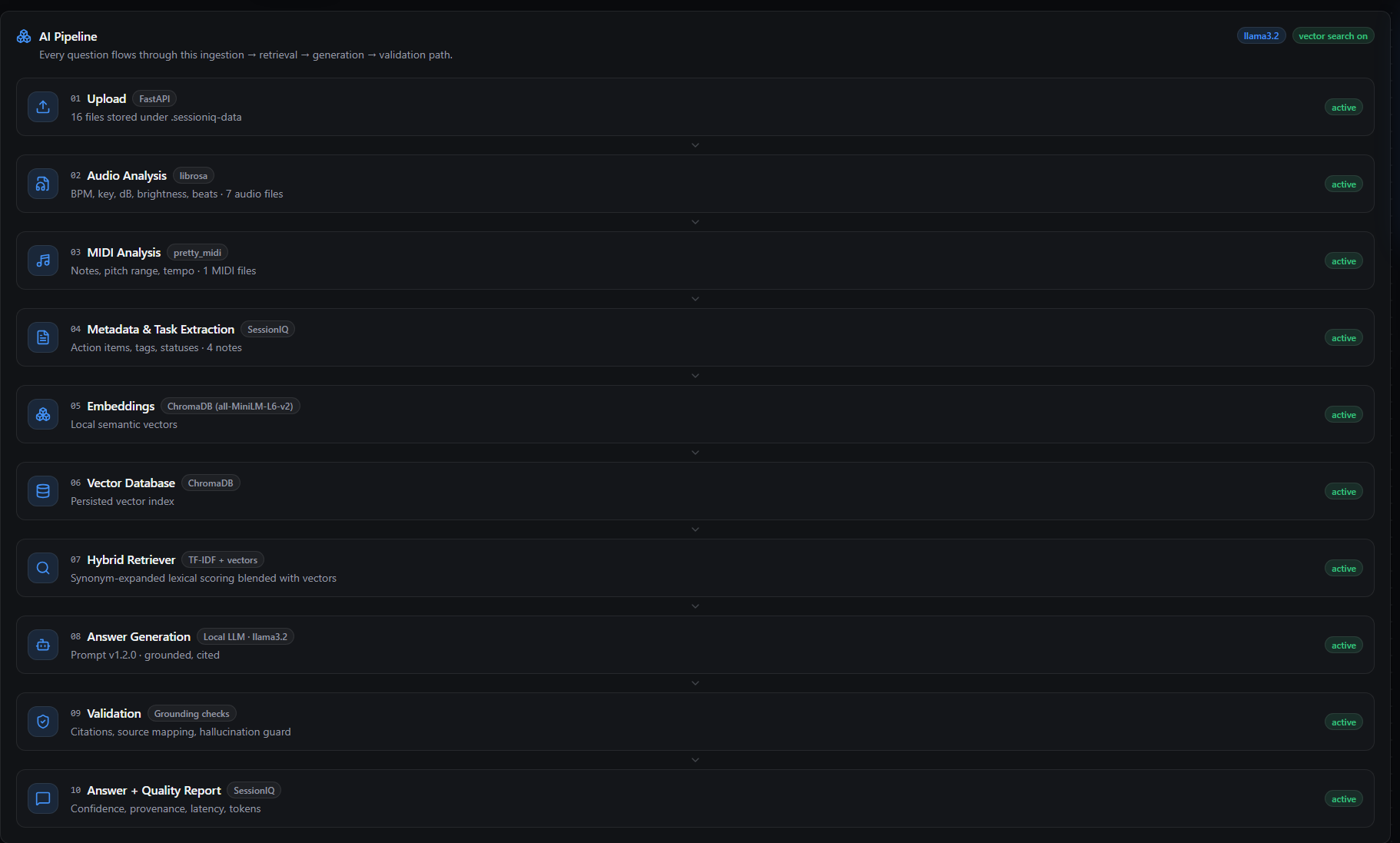
The Pipeline view: ten numbered stages from upload through audio and MIDI analysis, embeddings, hybrid retrieval and answer generation to validation, each labelled with the library it uses and an active status.

The running system, not a diagram — each stage reports whether it is active.

Your own agent can ask the same questions. SessionIQ speaks the Model Context Protocol, so Claude Desktop, Cursor or an agent you write can query your library through the identical tool layer the numbers below are measuring.

MCP setup
0.733
ranked firstthe right file, out of 30 labeled questions
0.900
in the top fiveevery expected file was found
7 / 7
computed answerscounts and superlatives, exactly right
1.9 ms
typical searchoffline, with no model loaded

Stated plainly: these come from one synthetic corpus of seventeen generated files and thirty hand-written questions. That is enough to compare retrieval configurations and far too small to be a benchmark. The evaluation does not score the wording of generated answers, and it does not measure hallucination. Both limits, and every case retrieval gets wrong, are written down in the methodology.

Methodology and limits

Getting it

Run SessionIQ locally.

Core analysis and library management run on your machine, with no account required. Use the offline assistant or configure a local or cloud model for generated responses.

One command starts it, with a demo library already built in so you can look around before pointing it at your own files. Semantic search and voice transcription are optional local add-ons, and the assistant works with no model configured at all.

terminal
$ docker run --rm -p 8080:8000 sessioniq

  Your library  http://localhost:8080
  Demo songs    17 files, 5 projects
  Assistant     offline / rules engine

What you need

Docker, if you want the one-command route. Prefer running it from source? Python 3.11+ and Node 22.18+ — the README walks through it, including optional local Ollama, ChromaDB and Whisper.